

Good afternoon. I'm having a problem with my Inpulse 500 using driver 2023 and firmware 1.66 on Windows 11. I've already tested it in Serato DJ, DJUCED, and DJY Pro, and they all have the same problems:
The volume gain buttons don't correspond to the position of the physical button on the controller. Only after I move them does it return to its normal position; otherwise, it increases the volume even when the music is at a high volume.
The jog wheels don't respond to vinyl mode, neither by clicking nor disabling them on the controller's button. If I put my hand on them and make a scratching motion, it doesn't respond, and rotating the jog wheel doesn't rewind or skip forward like it's a vinyl record.
The other day I had to uninstall driver 2023 and reinstall it to at least get the controller to recognize it, even though I had used it the day before. It recognizes it, but all the problems mentioned above persist. I saw a calibration guide here in the group. Could you tell me if it would work to try this and see if it solves these problems? Thank you.

@Welcome on Forum marceloalvesdj1
Have you updated all the drivers on your motherboard to the latest version?
Did the problem only start after an update?
Can you describe in more detail what you did before?
@Baumi! Thank you.
My notebook is fully updated, from BIOS to all drivers.
I made a mistake in its configuration: Lenovo Thinkpad - i7 11th generation, with 16 GB of RAM and 1 terabyte SSD.
So, I had a 400 before and it ran perfectly, and then I bought the Inpulse 500 and the problems I mentioned started. I thought it was a software issue, but I installed Serato, DJuced, and now what I've bought is DJ AY Pro.
It doesn't respond to the physical buttons with the system:
For example, my button on the controller is set to 9 o'clock on a clock, but when I launch the music it appears as 12 o'clock in the program. Then I move the button and it recognizes it... things that didn't happen with the Pioneer 400.
Same thing with the games, while the vinyl mode works, out of nowhere it doesn't move...it freezes...you run the game and it doesn't change the graphics in the system.
Anyway, I've already set it to 128, 256, 512 and everything stays the same in the driver. So I have hope in this recalibration guide.
Did you encounter the same problem immediately after updating to Windows 500, or was there a Windows update from Microsoft before you did that?
I could well imagine that this would cause problems, which used to be the case quite often. Just a guess. Have you tried reconfiguring the cabling?
Have you uninstalled the driver, restarted the computer, and then reinstalled it?

Hello Marcello,
Welcome on Hercules DJ forum.
1) I have posted to your attention (in private message area) a calibration guideline for DJControl Inpulse 500 but, if I understand you well (I am not sure as your 1st post has a format issue limiting its readability) the issue may be that the DJ app does not receive the positions of the DJ controller potentiometers at the boot.
If that is the problem, you should check if you may have installed one of Windows 11 preview updates (as KB5077241 or KB5074105) which may cause MIDI issues.
In my opinion, you should test on another computer with the same controller if you duplicate this problem in Djuced or Serato. If you do not duplicate the problem, it is not related to the controller or the Dj app, but to a setting in the 1st computer, and I first consider these KB preview updates.
You can find here a guideline on how to remove this update.
2) The normal way for a Hercules DJ controller to work in DJUCED or serato is as follows;
- You connect the DJ controller to the computer
- Tou run the DJ app, Serato DJ or Djuced
- The DJ app detects the DJ controller connected
- The DJ app loads the MIDI map of the controller
- The DJ app sends a MIDI request to the controller, to know the position of all potentiometers and faders: for Hercules, the MIDI request is
- in hexadecimal format: 0xB0 0x7F ox 7F
- in decimal format: 176 127 127
- The DJ controller answers with the list of gradual controls and their position
- The DJ app takes these positions as starting point in this session
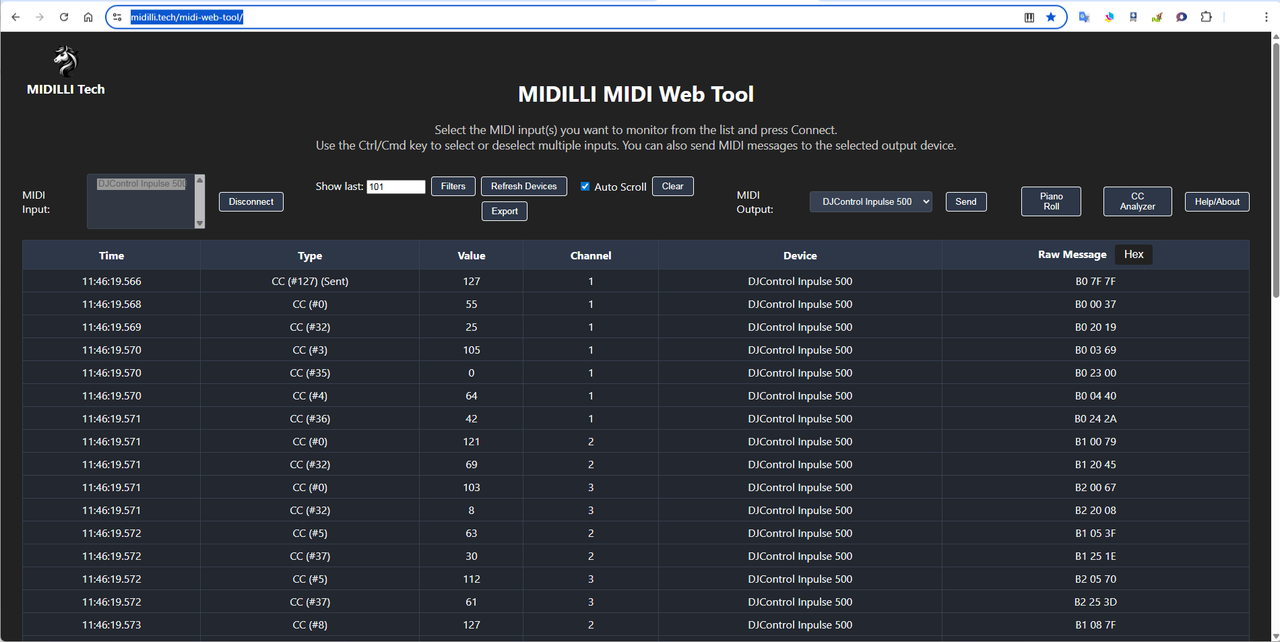
You can check if the DJ controller sends potentiometers position (on another computer) as follows:
- Connect the DJ controller to the PC
- Run Google Chrome
- Go to https://midilli.tech/midi-web-tool/
- On top left, on MIDI input, select the DJ controller name
- Click on Connect button
- On top right, on MIDI Output, you should see the DJ Controller name
- Click on Send
- In the pop up, type the MIDI command: 0xB0 0x7F 0x7F
- Click on OK
- The DJ Controller sends the position of faders and potentiometers.
Hey UX Team, that's a very nice guide you've put together.
Marcello,
About the vinyl mode on the controller, please describe what you do, in which DJ app, and with which result.
As the 1st post talks of jog wheel not responding in vinyl mode, and the 2nd post talks of display freezing in vinyl mode, it is a very different so please describe in which DJ app you get each symptom, and what you were doing precisely at the moment it occurred.
If you are more at ease writing in spanish, please write in spanish, I cannot write it but I can read it so I will understand what you write.
