

Hello Guys
I have a serious Problem that after downloading the last update of DJUCED and connecting the Controller - the Play button does not respond at all, it appears in blue on the screen while I click on the button in the Controller, but no music starts, Nothing moves on the screen even while moving the jogwheels.

Hello Issam-Jaridi,
Welcome to the forum.
Please precise the name of your DJ controller and, if you have installed the Hercules DJ drivers, please go to the Hercules DJ control panel, go at the about tab, and precise the firmware version.
For example, if the DJ controller is a DJControl Inpulse 500, then, when I open the Hercules DJ control panel and go at the About tab
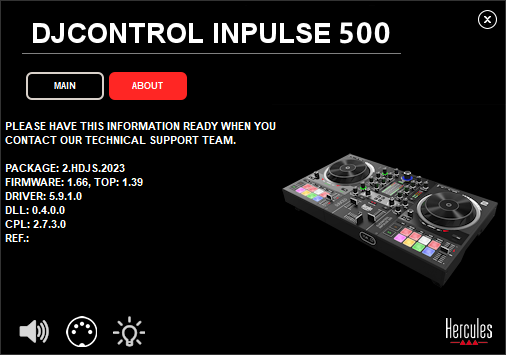
what I read here for firmware is: Firmware 1.66, Top:1.39
Hello Issam-Jaridi,
I forgot to ask, what is your operating system, Windows or macOS?
My Device is : DJControl Glow : removed link
No problem with the device or the connection, I connected it successfully and the 2 Cue buttons Glew, but with or without the device the demo music or my music cannot play and the virtual Jogwheel does not spin, Nothing moves at all when pushing the start or cue button in djuced or the dj device.
My Laptop's operating system is : Windows 7

Hello.
This can happen when the wrong soundcard is selected into the settings.
So be sure that DJUCED plays on your computer soundcard (or the one you want to use).
If it still doesn't work, you can try to reset the settings to default : https://www.djuced.com/kb/how-to-reset-all-djuced-settings-to-default/
Anyway, DJUCED doesn't not support officially Windows 7 and Windows 10 since years are Microsoft stopped the support too.
It is possible that new versions does't work, as the devs can't check and tests on these old OS.
If a new version can't work, you can find archives of DJUCED installers here : https://www.djuced.com/archive/
Thank you very very much I will try using this infos to solve the problem
Have a great day 🌹
