

Hello all,
I recently purchased the Hercules Impulse 500 and very dissapointed. I did NOT see any negative reviews or warnings about Serato DJ Pro and this controller.
How is it that 6 years after release, this controller does NOT work with Serato DJ Pro. LOL. It should not be listed as a Serato controller at all.
That said, I'm late to the party and while I could technically return the controller I suppose I could try mapping the mic, cue volumes, and fader settings to "save"
This appears to be a common problem, unbeknownst to me, but how is there NOT a map for download already?
insane. very disappointed.

Hello, thanks for the links. Ive already been through those and followed the directions. No change. The controller does not save all the settings I mentioned. Faders (up and cross) default back. Cannot use the cue volumes, mic, or aux volumes. I use Logic Pro with my Solid State SSL2 mk 2.
nothing else. I’ve have owned two other controllers.. last being a Pionner DDJ FLX4,I felt I outgrew… damn.

Hello
DJControl Inpulse 500 is a Serato DJ Lite controller, as it is written on Hercules website and on Serato website.
https://serato.com/dj/hardware/hercules-djcontrol-inpulse-500
https://www.hercules.com/en/product/djcontrol-inpulse-500/
this Dj controller unlocks Serato DJ Lite, not Serato DJ Pro (as DDJ-FLX4, which is a Serato DJ Lite controller, not a Serato DJ Pro controller).
To use it with Serato DJ Pro, you need a Serato DJ Pro or Serato DJ Suite upgrade licence.
Hi,
thanks for your response.
I have a Serato DJ Pro license. Prior to the Impulse 500, I had DDJFL4 for roughly 18 months. Before the FLX4, I had a Numark Party Mix. I bought a Serato DJ Pro license early on because I wanted all the features of Serato DJ Pro.
That said, I have the Impulse 500 controller. I am disappointed that 6 years after release, the controller is NOT fully mapped to Serato. That just seems ridiculous to me. I don't care who's fault it is. The controller is inferior when using Serato DJ Pro.
Why? Because I am unable to MIDI map the controller to the software, even thought the buttons are 1:1 hardware vs. software (layout vs UI)
Hello Chop_Chop,
1) If you have activated your Serato DJ Pro licence on this computer, then DJControl Inpulse 500 should be detected in Serato DJ Pro on this computer.
Please go Serato website, login with your account, click on account and check Manage Devices https://my.serato.com/#/devices
This Serato web page tells you on which computer your Serato DJ Pro is activated: if you have bought a Serato DJ Pro upgrade license, then this license is valid on 2 computers so, if you have already used 2 other computers, you must use this serato page to deactivate the Serato DJ Pro licence from your old computers and activate it onb new computers.
2) If you feel ready to write in a message on the forum
describing what you have
- version of Windows or macOS,
- version of Hercules DJ drivers if it is a Windows computer,
- type of Serato DJ Pro licence - flat Pro upgrade or Pro subscription or Suite subscription,
- version of Serato DJ Pro,
describing what you see on the screen when connecting the DJControl Inpulse 500
- in Hercules DJ control panel,
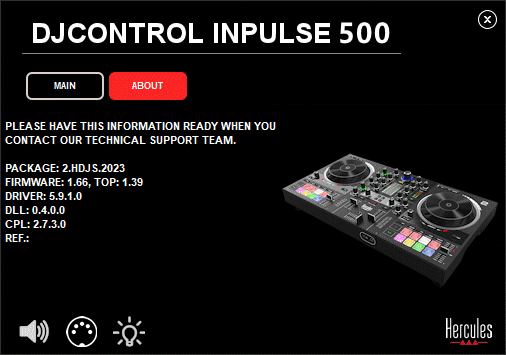
- in Serato DJ Pro,
then maybe someone can understand why on your computer "this controller does NOT work with Serato DJ Pro", and provide technical guidance.
If you have a Serato DJ Pro upgrade licence enabled on your computer, then Serato DJ Pro manual for DJControl Inpulse 500 is on
If you do feel at ease on the forum, you may also contact Hercules technical support on
https://support.hercules.com/en/contact-en/
thanks again. I am unable to upload screen shots for some reason - I am on a M4 Mac Air.
I have a FULL SERATO DJ PRO LICENSE. I paid $249 or whatever it cost in 2024-2025 for the license. I have used this license with two controllers. No issues with either controller.
TODAY - I have a Hercules Impulse 500 controller that does not work 100% in Serato DJ Pro. The Mic Volume, Aux Volume, Cue-master mix, and cue volumes do not work. They are greyed out in Serato DJ. I have the screens shots.
Additionally, THE UPFADERs and CROSSFADER do NOT hold their respective positions - I set everything 12 o-'clock OR 50% within Serato DJ Pro and like to keep them that way.
LASTLY: I did a manual update / re-flash on the controller over the weekend. I restored default and have been dealing with it since.
I'm a mixcloud / home-dj so it's not going to kill me. It is a moderate inconvenience using the controller thus far.
three. - anywho, I appreciate it. I will be checking in every day or so. rofl.
Hello Chop-Chop,
DJControl Inpulse 500 following controls
- Mic Volume,
- Mic EQ
- Aux Volume,
- Aux Filter,
- Cue-master mix,
- Cue volume,
- Master volume
are hardware controls, they are not processsed in the computer app, these commands are processed in hardware, in the embedded DSP and Codecs,
so they are not visible in Serato DJ: it does not mean they do not work, it means they work out of Serato (before for the inputs / after for the outputs). You may be misleaded because they also send a MIDI command, but it is just for users who want to map it on other functions.
I am not sure I see your issue with fader positions but I can send you a guide to recalibrate faders & rotary caps on Inpulse 500.
EVERY TIME I open Serato DJ Pro, I have adjust THE UPFADERs and CROSSFADERs to back their previous 12 o'clock positions.
*how does that work? My samples and effects are saved on the controller. *the two previous controllers held the crossfader and upfaDERs positions inside the software because those settings are variable.
That is my main gripe with this controller.
Hello Chop_Chop,
OK, now I see what you mean: yes DJControl Inpulse 500 starts with crossfader virtual position on middle and volume faders virtual position of mid travel, whatever the hardware control position: that was a request we had after some users experienced a too loud, or hearable sound when connecting their Inpulse 500 to the public address system for public performance, because at home their small speakers are more forgiving than PA systems, so we made this "forgiving setting" with Serato to give time to set the cross & volume faders.
if you do no like this setting, we can make a MIDI mapping changing this setting, but this settting is not exclusive to Hercules, so be aware this is not a bug & not a first time.
I mapped the aux filter knob to the crossfader curve.
I mapped the aux volume knob to the Serato DJ Pro master
I mapped the mic low knob to the upfader curve.
The aux volume to Serato DJ pro was the first one I mapped and it saves. I will see if the other two saved upon restarting Serato DJ Pro.
