

I have Djuced on my laptop with hercules 500, and never had a problem. But I cannot install it on my PC. I have tried all the suggested fixes, running as administrtor, adding exception to windows security, even turning security off, but still no luck. The program opens, but just hangs and does nothing. Any one else had this problem?

Hello Ahanti,
Thanks for your message, please precise your PC operating system, computer, CPU, graphics card.
OS Name Microsoft Windows 11 Pro
MINISFORUM Venus UM790 Pro Mini PC
Processor AMD Ryzen 9 7940HS w/ Radeon 780M Graphics, 4001 Mhz, 8 Core(s), 16 Logical Processor(s)
The problem exists with or without the Impulse 500 controller
Hi,
Thanks for the fast answer.
Please confirm if Serato DJ Lite works on the computer.
Can you try the following process
- download DJUCED from djuced.com website
- check your Windows account is administrator on the computer,
- uninstall DJUCED (via Start > Settings > Apps > Installed apps> DJUCED > More ... Uninstall),
- then check in Documents, and delete the DJUCED folder if any,
- then restart Windows,
- and then reinstall DJUCED?
Thanks for your reply, What I did not mention was the app icon has a microsoft security sheild on it. I have made exceptions in windows defender. I have reinstalled several times, using revo uninstaller, so removing all traces before reinstalling. Serato Dj lite does work
Hello,
Thanks for your answer.
Windows shield mini icon close the DJ app icon means when you click on the icon, it runs the app in administrator mode, but it does not mean a security issue.
Anyway, it is not a needed setting, so as Djuced does not work as planned, I suggest disabling it:
- Right-click on Djuced icon on the desktop,
- Properties
- Advanced
- and uncheld the field "Run as Administrator"
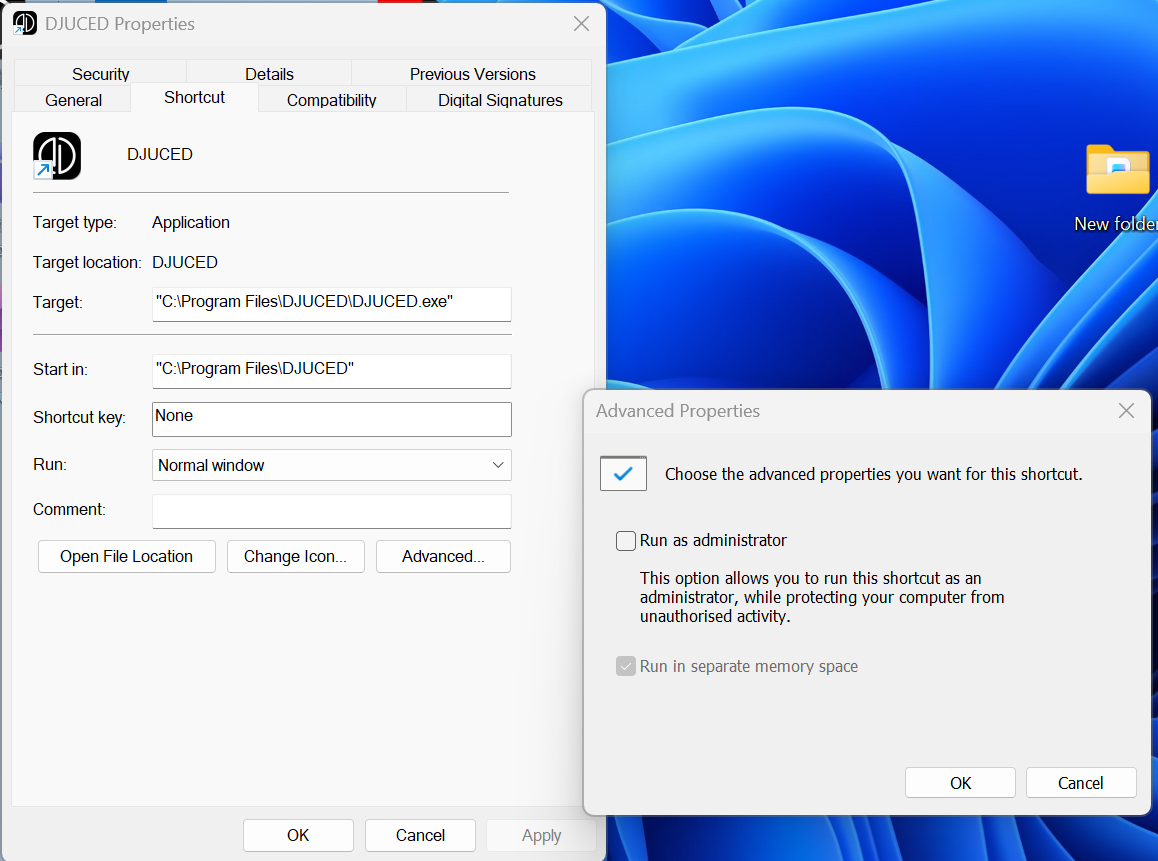
Then click on OK, and restart the Windows session (to make sure there is no hidden screen Windows expects you to answer to complete Djuced launch, as if you do not see the pop up screen, you cannot answer to this message, and the app remains hanging).
Which version of Djuced did you install?
I have tried everything. The shield is not on the icon, it's on the installer. I am just about to give up this whole business. I have also tried all of the below, and a few things more. All's I get is a dead UI. only closeable through the task manager. It is not set to run as adminstrator
Stuff I tried
That shield on the DJUCED installer is almost always Windows security (SmartScreen / Defender / Controlled Folder Access) blocking or restricting it. You don’t remove the shield itself, but you allow or unblock the installer. Try these in order 👇
1️⃣ Unblock the installer file (most common fix)
-
Right-click the DJUCED installer (.exe)
-
Click Properties
-
On the General tab:
-
If you see “This file came from another computer and might be blocked”
-
Tick Unblock
-
-
Click Apply → OK
-
Run the installer again
2️⃣ Bypass SmartScreen (blue warning screen)
If you get “Windows protected your PC”:
-
Click More info
-
Click Run anyway
This does not disable security permanently.
3️⃣ Temporarily disable SmartScreen (if it won’t run at all)
-
Settings → Privacy & Security
-
Windows Security → App & browser control
-
Set Check apps and files to Warn (or Off temporarily)
-
Run the installer
-
Turn it back On afterward
4️⃣ Check Windows Defender quarantine
Sometimes DJUCED is silently blocked.
-
Windows Security
-
Virus & threat protection
-
Protection history
-
If DJUCED is listed:
-
Click it → Allow on device
-
5️⃣ Add DJUCED as an exclusion (recommended if install freezes)
-
Windows Security
-
Virus & threat protection → Manage settings
-
Exclusions → Add or remove exclusions
-
Add:
-
The DJUCED installer
.exe -
Or the folder you installed it to
-
6️⃣ Run as Administrator
Right-click installer → Run as administrator
⚠️ If the shield is still there
That’s normal — it just means the app requires elevated permissions. What matters is whether it runs.
If you want, tell me:
-
Exact Windows 11 error message
-
Whether DJUCED installs but won’t open, or won’t install at all
Given your earlier DJUCED issues on Windows 11, this may also be Memory Integrity / driver blocking, which we can fix next.

What might also help is to right-click on the program, select “Properties,” and set it to Win8 on Win 11 so that the program thinks it is for Windows 8. This sometimes helps to be able to use some programs under Win 11. However, I cannot guarantee that it will work.
Thanks. I tried that one already
Can you tell me exactly which version of Windows 11 you are using, is it 25h2 or 26h1? I could look into that for you. Which antivirus software are you using exactly?
At the beginning of this saga i was on 24 whatever. I have since updated to 25H2, and Windows defender. I've more or less given up hope of this ever working. I can understand if you do too. But your valiant efforts are appreciated
I have just installed a 3rd party anti virus program, which overrides Windows security. But it still won't open, so I guess we can rule that out as being the cause
Enter Winver in the search field, press Enter, and take a close look at which 25h2 Build 12345567 is displayed. This is just an example; I can search for it more precisely later. It would be very helpful to know the error. Thank you. Best regards, Baumi
Also, I have download many hundreds of programs as a music producer. Djuced is the only one that comes with a microsoft shield
