Using Djuced + mk200. Master output 1 and 2. Headphones 3 and 4. when i click the headphone button on the deck to listen to the upcoming track, it automatically plays on the master tracks and muddies the track. How do i change this?

Hello Chandra.Vishnu91,
Welcome back.
It is always good to describe your technical configuration (CPU, operating system, and drivers) when you meet a technical problem as solving a technical problem is faster when knowing the technical environment.
I see 2 possible directions for your technical problem, but maybe I am wrong:
1) When you hear in the master output the song you preview in the headphones
It sounds as a Windows issue with a virtualisation runtime (possibly installed by a game).
The workaround is easy: use in DJUCED Hercules DJControl Inpulse 200 Mk2 ASIO device instead of the WASAPI device. Windows WASAPI device is generally OK, but it is touched by any audio runtime you install in your computer.
2) Playing the preview muddles the track
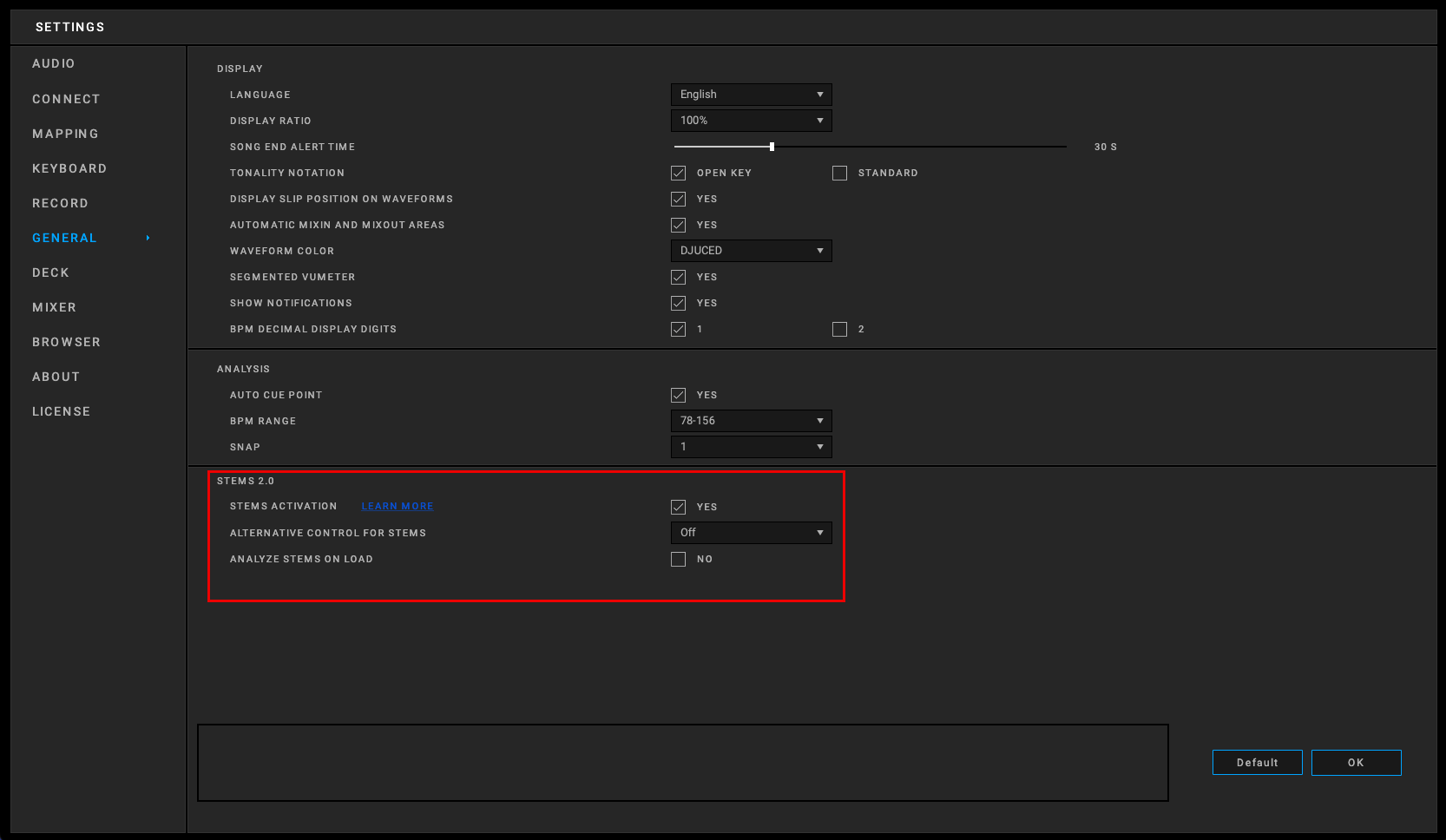
I am not sure of what you call muddles the track, so in case you mean another issue than hearing the previewed track in the master output, then maybe you computer is lacking CPU / RAM ressources at the moment you play the track you preview, and then you should check in DJUCED settings > General > Stems 2.0 if the setting "Analyze stems on load" is disabled, since if it is enabled, it is CPU intensive.