

Dear reader,
I just got my Hercules djcontrol inpulse 300 mk2 and I try to mix on Serato DJ Lite and the crossfader isn't working. I checked and there is an imput but it doesn't do anything in the software.

Hello Zackcoteroyer,
Welcome to the forum.
If the crossfader fully works in DJUCED but not in Serato DJ Lite, then maybe you have used Serato DJ Pro and disabled the crossfader in Serato DJ Pro, which may have the same result in Serato DJ Lite.
If you still have access to Serato DJ Pro:
- please run Serato DJ Pro, go in Settings > Mixer and in Crossfader section, you can uncheck the Disable option
- then close Serato DJ Pro, run Serato DJ Lite, and check if it solves your problem.

If you no longer have access to Serato DJ Pro, then you may fix your problem in:
- uninstalling your Serato DJ Pro program if any,
- uninstalling your Serato DJ Lite program,
- closing and restarting Windows,
- reinstalling Serato DJ Lite.
Hi Team,
Thank you for the quick response but I checked and it wasn't in fact disabled. Also, sorry again for the unprecision, but the crossfader doesn't work on DJuced neither. DJuced knows that there's a signal, but the crossfader doesn't do anything. The same applies on Serato DJ Lite (by the way I never had Serato DJ Pro). I also have the same problem with the volume fader chanels. Finaly, I checked and everything is updated from the softwares to the DJ controller so I am clueless.
Hello Zack,
Thanks for the answer, it may be useful to check whether the fader is damaged or needs recalibration.
To check if it is damaged, can you:
- Close the DJ app,
- Run Google Chrome
- Go to a MIDI testing website, as MIDILLI Tech MIDI Web Tool, HardwareTester MIDI, or Morningstar MIDI Monitor,
- check if the controller does not send continuously MIDI commands when you do not use it (it is sends non stop MIDI commands, the control sending MIDI command is probably defective, and this control, for example the crossfader component, must be changed)
Then check in MIDI testing website, if when you move the crossfader from right to left, you get a gradual change from left to right.
For example in Midilli.tec/ MIDI Web tool, if the crossfader was fully working,
- with crossfader is fully on left, you should see the last raw message B0 00 00 and B0 20 00
- with crossfader fully on right, you should see the last raw messages B0 00 7F and B0 20 7F.
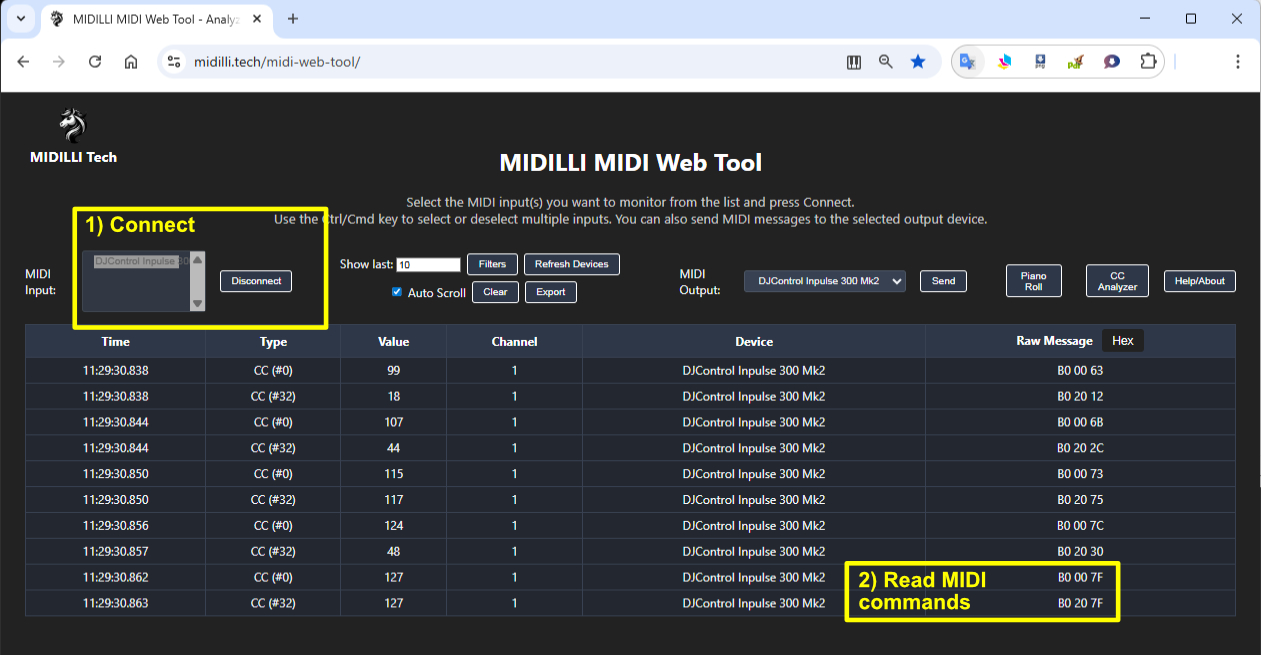
If the DJControl Inpulse 300 Mk2 does not send continuous MIDI messages while you do not use, and has a crossfader sending gradual MIDI commands which do not cover the full 00 to 7F spectrum of MIDI commands, then it should be possible to recalibrate it.
Dear Team,
The calibration is all good but the problem's still there. I also checked the little lights under "Master" and the volume was reducing when I played with the gain, but not with the crossfader or the volume channels.
Hello Zack,
Just in case, can you:
- uninstall the DJ controller driver,
- reboot the computer,
- reinstall the DJ controller driver.
I have met a strange MIDI issue (not the same as yours, but still irrelevant MIDI) on DJ controller after Windows updated the Intel drivers of the computer USB host, and uninstalling/reinstalling the DJ controller driver restored a proper MIDI behaviour.
Regarding the vumeters, it is normal deck 1 and deck 2 vumeters do not depend on the volume faders position, as they are pre-fader vumeters (intended to help to set the gain).
Regarding the master vumeter, it is logical it matches the master sound you hear: please confirm you have checked in Serato > Sedttings > Mixer that the crossfader is not disabled.
